Sign Up & Save 10% on Your
First Purchase!
Unlock exclusive deals, discounts, and insider golf tips
One Tag. Entire Game Intelligence.
Couldn't load pickup availability
Why Golfers Are Switching to SuperTags™
⚠️ IMPORTANT SOFTWARE REQUIREMENT: YOU CAN'T PLAY WITHOUT POWER
SkyGolf SuperTags™ are high-precision hardware sensors powered by the SkyGolf 360 Cloud. To activate your tags and view your shot data, you must have an active SkyGolf 360 Membership.
Using 1 to 5 Tags? You need at least a Birdie, Eagle, or Double Eagle membership to unlock SwingTraX™ 360 (swing speed, tempo, path, and 3D visualization).
Using 6 to 14 Tags? You must select the PRO X Membership to unlock GameTraX™ 360 (automatic on-course shot tracking, GPS mapping, and Strokes Gained analytics).
Using a Launch Monitor / Simulator? You must select the PRO Plus Membership to sync live club delivery data directly into your SkyTrak or 3rd-party simulator.
Already an active SkyGolf member with the correct tier? Select "None" in the membership dropdown.

⚠️ IMPORTANT SOFTWARE REQUIREMENT: YOU CAN'T PLAY WITHOUT POWER
SkyGolf SuperTags™ are high-precision hardware sensors powered by the SkyGolf 360 Cloud. To activate your tags and view your shot data, you must have an active SkyGolf 360 Membership.
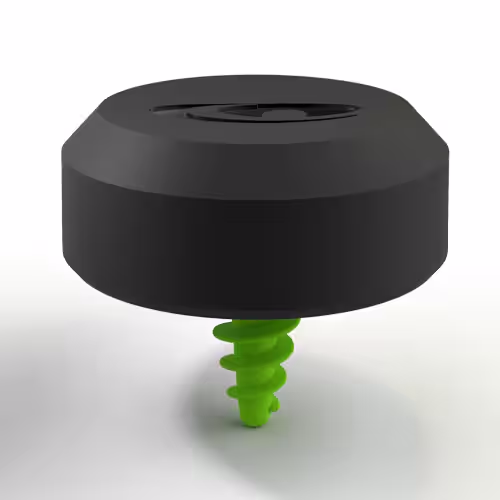
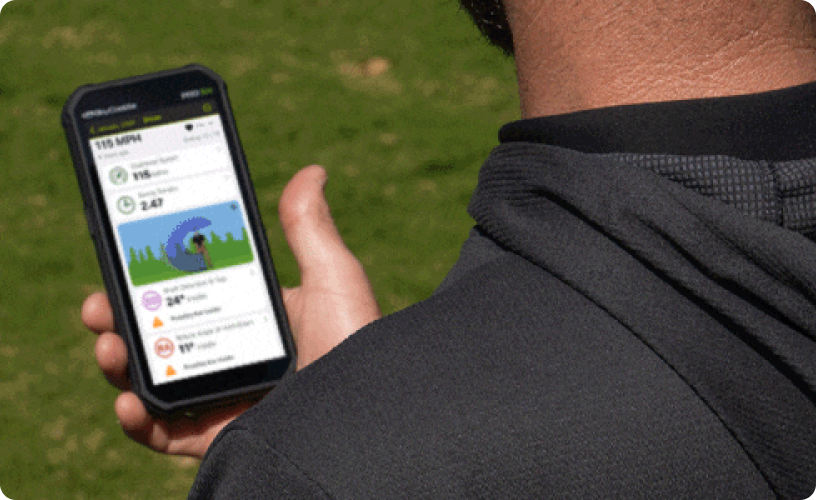
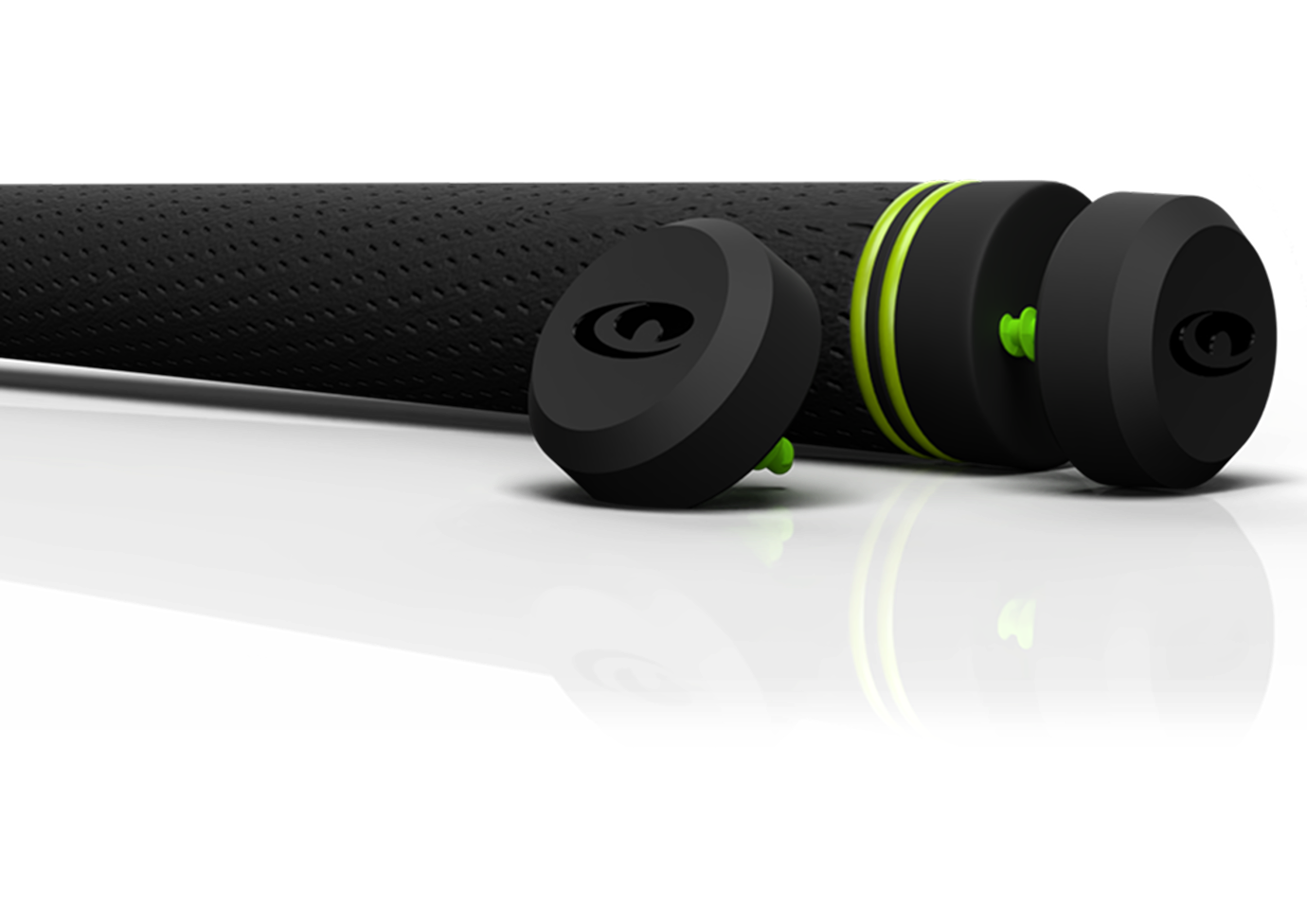
Attach SuperTags™ to your golf clubs and perform a quick and easy calibration using your SkyCaddie or qualifying mobile device to create an Estik™.
Start Swinging. Whether you are practicing or using a simulator/launch monitor, your swing, club metrics and performance data are captured automatically.
Review and analyze your practice session in the SkyGolf 360 Cloud to track your performance and target your game and swing improvement goals.
⚠️ IMPORTANT SOFTWARE REQUIREMENT: YOU CAN'T PLAY WITHOUT POWER
SkyGolf SuperTags™ are high-precision hardware sensors powered by the SkyGolf 360 Cloud. To activate your tags and view your shot data, you must have an active SkyGolf 360 Membership.
Elevate your game with GameTraX™ 360, the most advanced system for tracking and improving your golf performance. Powered by revolutionary technology,Advanced Ball Strike Technology™,SuperTags™ automatically capture both shot and swing data for every shot both on and off the course. Combined with SkyCaddie’s precise GPS, GameTraX 360 brings professional-level insights to golfers at all levels, making it easy to understand and improve every aspect of your game.
Whether you’re looking to fine-tune your swing, gain confidence in your club choices, or understand the nuances of your putting stroke, GameTraX 360 has you covered. This is more than just a tracker—it’s your personal guide to playing better golf, both on and off the course.
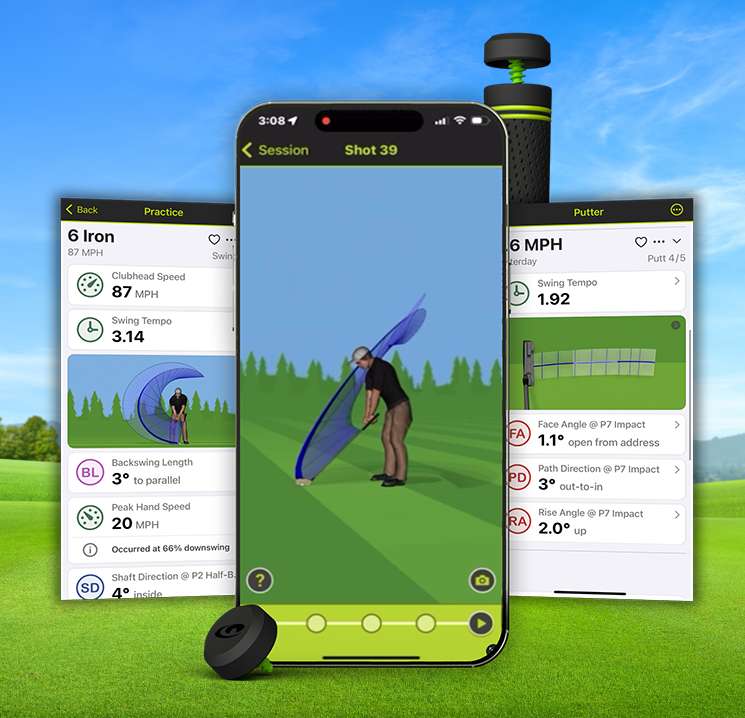
Take your practice to the next level with SwingTraX™ 360 — the most advanced system for tracking your golf swing performance. Combining cutting-edge SuperTags™ technology and SwingTraX 360 application, you have everything you need to analyze and improve your game, all in one easy-to-use package. With features like 3D swing visualization and effortless automatic data capture, you’ll have access insights at your fingertips that have only been available to Tour Pros before SwingTrax 360.
Whether you’re looking to fine-tune your swing, gain confidence in your club choices, or understand the nuances of your putting stroke, SwingTraX 360 has you covered.
Putting is the ultimate make-or-break skill on the golf course. Mastering it is the absolute fastest way to shave strokes off your scorecard.
You might not have a personal PGA instructor watching you practice every day, but with SwingTraX™ 360, you have the next best thing. Powered by our patented SuperTag™ calibration system, this is the ultimate tool to bridge the gap between amateur guessing and professional precision.
SwingTraX™ 360 is more than just an add-on; it`s a game-changer for golfers who already own a launch monitor. Powered by SkyGolf`s revolutionary SuperTags™, SwingTraX™ 360 delivers advanced swing analysis and club performance data that goes beyond what most launch monitors can provide. It seamlessly integrates with your existing setup to enhance the data you receive and uncover deeper insights into your game.
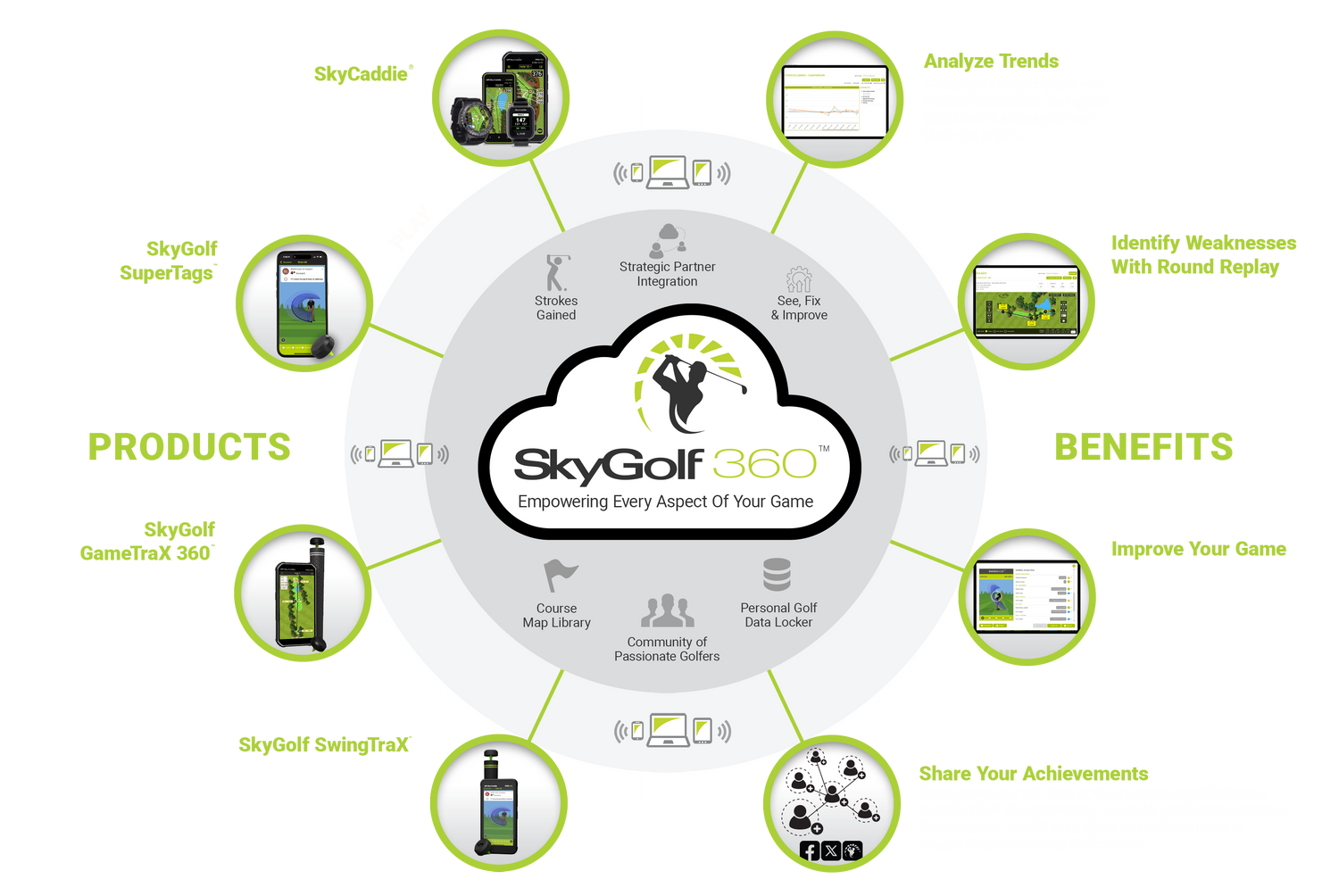
Welcome to SkyGolf 360™, the ultimate online community for passionate golfers. SkyGolf 360™ connects you to your game, your courses, your coaches, and a vibrant network of fellow golfers. By seamlessly syncing all SkyGolf products to the SkyGolf 360 Cloud, you’ll gain a comprehensive view of your performance, helping you achieve better golf through better information.
Access Anywhere, Anytime
Thanks to innovative features like SuperTags, GameTraX 360, and SwingTraX 360, your swing metrics and performance data are always at your fingertips. Analyze, compare, and share your data effortlessly from any device—PC, tablet, or smartphone—using the SkyGolf 360 mobile App or Web Portal. Golf improvement has never been this accessible or engaging.
Join Golf’s Premier Community
Become part of an exclusive network of golfers who share your passion for the game. SkyGolf 360™ isn’t just about improvement; it’s about making golf more fun and rewarding. Whether you’re looking to shave strokes off your score or simply enjoy the camaraderie of fellow golfers, SkyGolf 360™ is your go-to destination.
Experience the Power of the SkyGolf 360™ Cloud
The SkyGolf 360™ Cloud is your all-in-one hub for performance insights. This web-based platform consolidates every aspect of your golf game, making it easy to collect, analyze, track, and share your rounds and performance data, whether on the course or off. Dive deep into your game with intuitive tools that highlight your strengths, reveal areas for improvement, and let you craft a personalized game improvement plan. Best of all, you can share your progress and insights with your coach or golfing friends.
Your Game Data, Seamlessly Integrated
SkyGolf 360™ adapts to your preferences, letting you track as many or as few stats as you desire. Every detail—from scorecards and round summaries to advanced metrics like Strokes Gained and club performance—is automatically uploaded via Bluetooth or WiFi from your SkyCaddie, SkyCaddie App, or SuperTags. Your personalized performance locker in the SkyGolf 360™ Cloud transforms raw data into actionable insights for instant analysis.
Connect with Golfers
Make new friends, create groups, discuss golf tips, equipment and achievements
Track Your Scores
Upload your scores from your SkyCaddie, or enter your scorecards manually, online
Real-time Statistics
Get real-time stats, reports, and charts to gain insight on fairways hit, GIRs and more!
Explore Courses
View details on over 35,000 golf courses worldwide, plus scorecards and reviews
Course Maps
Download highly accurate, TrueGround® Course Maps to your SkyCaddie
Personal Golf Cloud
Store your game data and access it anytime and anywhere in the SkyGolf 360 Cloud
Member Benefits
Access exclusive, Member-Only offers and products online
Share Your Game
Share your progress with your friends, family and your golf instructor
Follow a Friend
Add a friend to your profile to view their scores, stats, favorite courses and live rounds
Form a Group
Create and manage a group for your foursome, golf league or other team
Manage Your Bag
Manage and review the golf equipment you own and use
Strokes Gained
Analyze a player's performance relative to specific benchmarks rather than just total score
Manage Your Account
Activate, transfer, upgrade and renew plans, as well as manage your device data
Swing Analysis
Capture and reproduce a 3D replay of your golf swing
Celebrate Successes
Announce your achievements such as a hole in one, breaking 80, or create your award!
Download Updates
Easily download available course and software updates for your devices
SwingTraX™ 360 utilizes the precision sensors of the SkyGolf SuperTag™ to process thousands of data points, providing a complete 3D model of your golf swing whether practicing on the range or playing on the course. In addition to producing a 3D model for you to interact with, SwingTraX™ 360 captures key swing metrics allowing you to analyze and target key areas of your golf swing to practice and improve.
In addition to tracking overall speed and timing data on your swing, SwingTraX™ 360 captures 12 swing metrics from 5 key positions of your golf swing including: Address (P1), Halfway Back (P2), Top of Swing (P4), Halfway Down (P6) and Impact (P7). By analyzing your golf swing from these individual positions you will be able to truly focus on improving your golf swing and lowering your scores.
ADDRESS (P1)
HALFWAY BACK (P2)
TOP OF SWING (P4)
HALFWAY DOWN (P6)
IMPACT (P7)
With SwingVue™ 360's 3D animated swing, SwingTraX™ 360 presents a virtual video of your swing in real time from any angle Advanced Ball Strike Technology™. Something you could only get by using multiple high-speed cameras.
You can select the specific metrics that can help you improve the different aspects of your swing, such as:
Every golfer has an optimum tempo and pace that will produce consistent results. SwingTraX™ 360 gives you 4 swing metrics to work on your Tempo and Timing.
SwingTrax™ 360 also provides 2 metrics to help you hit it farther and to improve your distance control.
Whether on the course or at the practice range, every golfer experiences that one shot they wish they could save. Now, with SwingTraX™ 360, you can mark any swing as a favorite and locate it effortlessly later. But that's not all – you can also compare that swing to any other to monitor your progress over time.
Mark It … See It ... Make it Better with SwingTraX™ 360!
SkyGolf's patented calibration technology provides unprecedented accuracy by precisely matching the SuperTag™ sensors to clubface alignment, loft, lie and club length.
Groove Training mode provides you with real time visual and audio feedback so that you can practice with a purpose. Just select the club to want to practice, swing metric you want to improve, set your target goal and Groove will automatically help you dial it in! Also, there are 3 proficiency levels to choose from, you can start easy and progress to the highest level as you improve.
You can perform Groove Training on the following metrics: Clubhead Speed, Swing Tempo, Shaft Angle, Shaft Lean, Face Angle, Shaft Direction, Backswing Length at various applicable swing positions.
Get your Groove Training going today and enjoy swing improvements almost immediately!
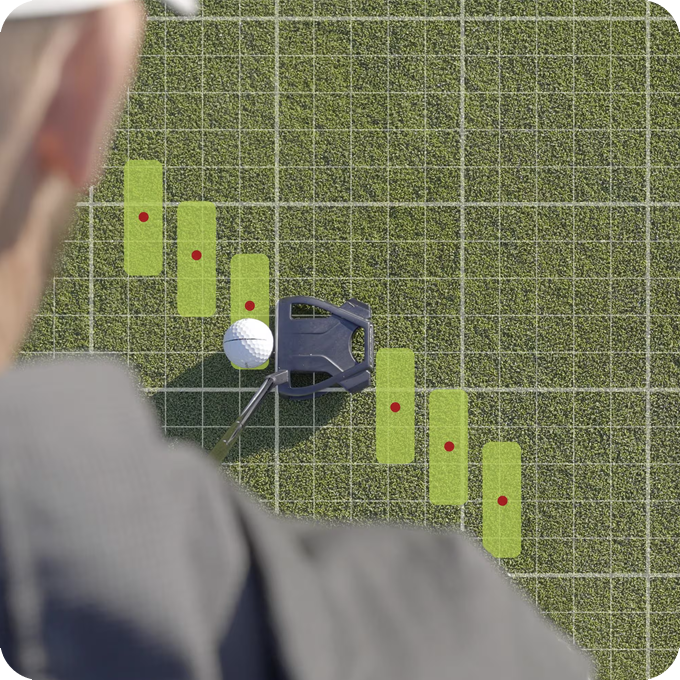
Putting is a skill that can make or break your round and mastering it can significantly lower your scores. With the right tools, techniques, time, and mindset, anyone can learn to putt like a pro. SwingTraX™ 360 is the right tool for the task! While you may not have a personal golf instructor to help you practice like a Pro everyday, you can have SwingTraX™ 360 with SwingVue™ 360 technology which is the next best thing! You can't fix it if you can't see it!
With SwingTraX™ 360 and SwingVue™ 360 3D animation technology, you can instantly see a virtual 3D model of your putting stroke in real time viewable from any angle. All you need is a SuperTag™ attached to your putter. No cameras or other special equipment required.
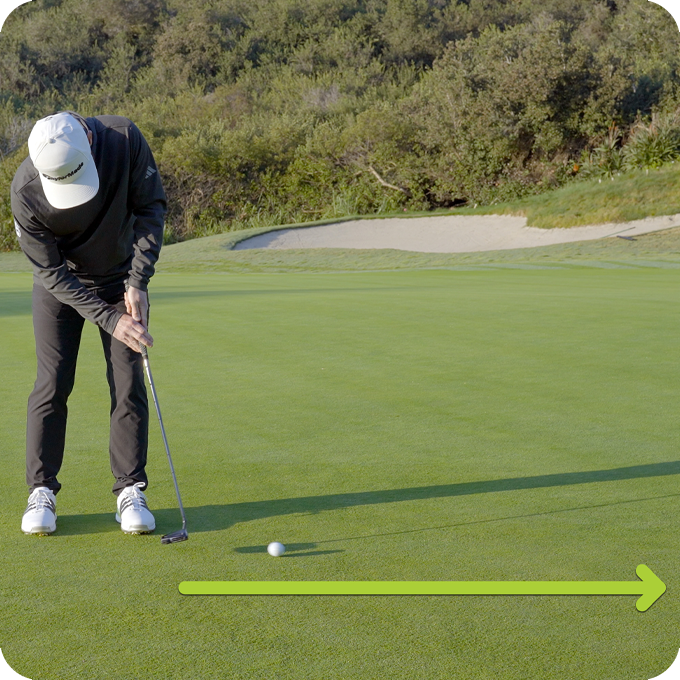
With the simple swipe of your finger, you can see your putting stroke path from any angle, or you can select from one of the three preset 3D camera views:
DOWN THE LINE
TOP VIEW
FRONT VIEW
For those golfers who want to take a deeper dive, SwingTraX™ presents 16 putting metrics from 3 key positions of your putting stroke so you can pinpoint your strengths and weaknesses.
You can select the specific metrics that can help you improve the different aspects of your putting game, such as:
SwingTraX™ 360's Groove Training mode provides you with real time visual and audio feedback so that you can practice with purpose.
Just select the parameter you want to improve and SwingTraX™ 360 will help you dial it in!
And with three proficiency levels to choose from, you can start easy and progress to the highest level as you continue to improve.
The system P1 through P10 describes the key positions during a golf swing that are important for analyzing and fixing potential flaws in your mechanics. SuperTag® provides metric parameters and 3D visualizations for five key positions that can have a significant impact on a golf swing - P1, P2, P4, P6, and P7.
ADDRESS (P1)
HALFWAY BACK (P2)
TOP OF SWING (P4)
HALFWAY DOWN (P6)
IMPACT (P7)
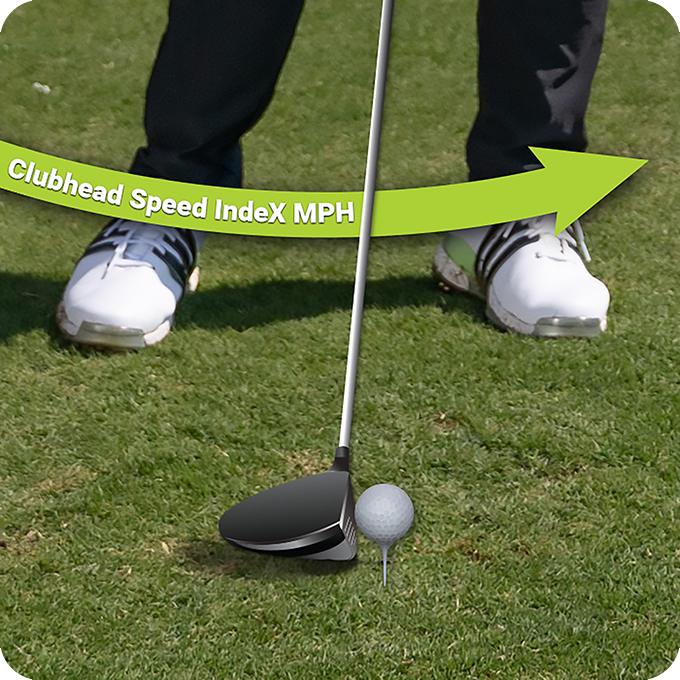
Clubhead Speed, or CHS, is a measure of how fast the putter is moving at impact P7.
Developing a good feel for CHS is essential for achieving effective distance control, especially in putting where minor variations in CHS can significantly influence the distance that a golf ball rolls.
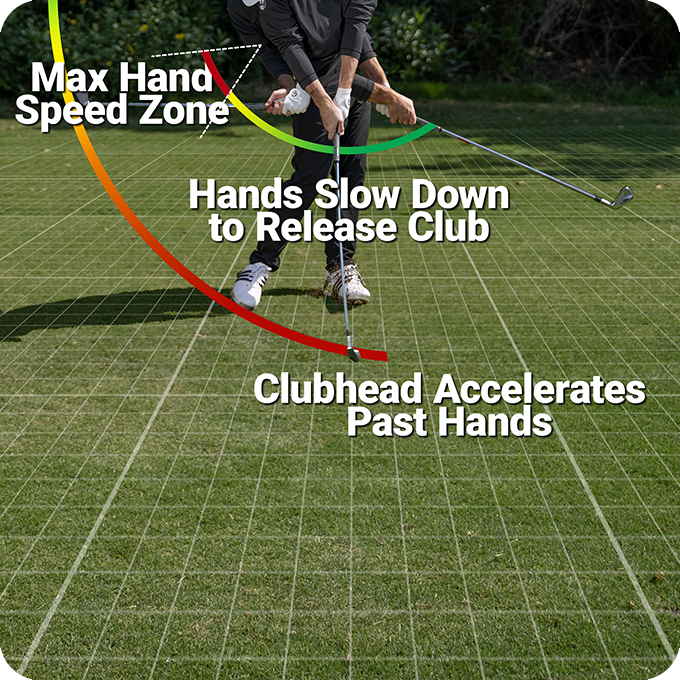
Peak hand speed refers to the maximum speed the hands reach during the downswing.
Ideally, Peak Hand Speed should occur at a point in the down swing near P6 Halfway Down as shown by the Red Max Hand Speed Zone in the image. Reaching peak hand speed at this point provides optimal time for the hands to efficiently release stored energy (lag) to the club head, maximizing club head speed at impact.
If hand speed peaks too early, the golfer loses the ability to store energy effectively. Conversely, if it occurs too late, there won’t be enough time to generate the full “whipping action” necessary for maximum impact speed.
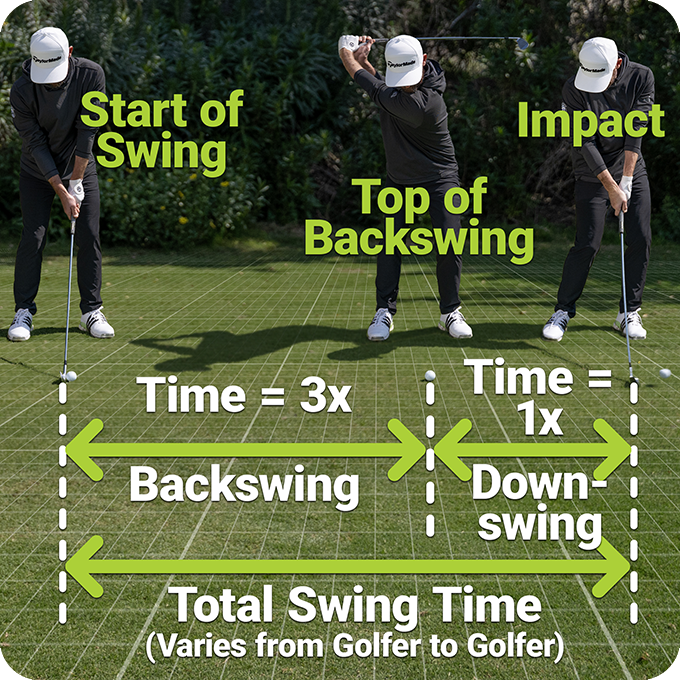
Swing Tempo refers to the rhythmic relationship between the duration of the backswing and that of the downswing time, expressed as a ratio. Maintaining a balanced tempo is essential for hitting consistent and powerful shots.
A typical full swing tempo is around 3:1, meaning the backswing takes about three times longer than the downswing. SuperTag displays this ratio as a decimal, such as 3.00.
For shorter shots like chips, pitches, and putts, a tempo of 2:1 (2.00) is generally more effective.
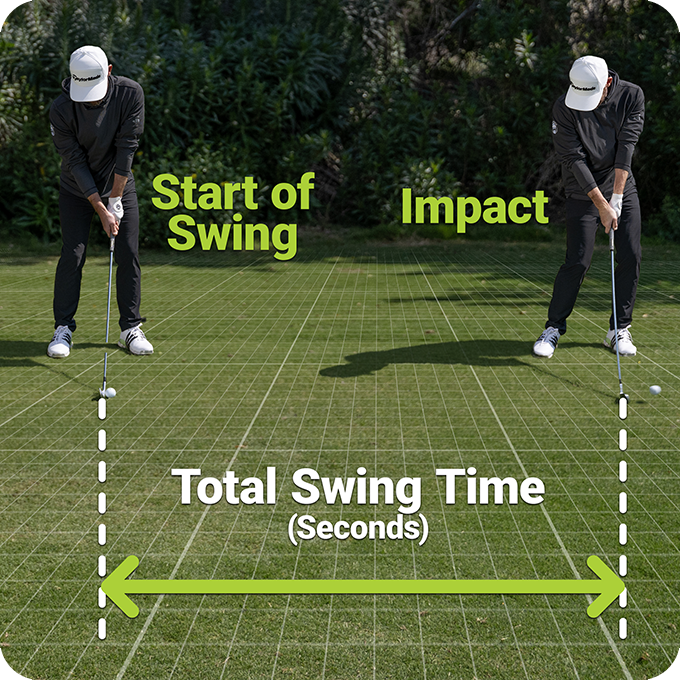
Total Swing Time measures the duration (pace) of a golf swing from the start of the backswing to the moment of impact with the ball. This time is typically measured in seconds or milliseconds.
Every golfer has an optimal swing pace that promotes consistent and accurate shots. Having a good pace will not only produce repeatable, high-quality shots, but it also plays a critical role in maintaining proper Tempo, which is essential for maximizing swing efficiency and overall performance.
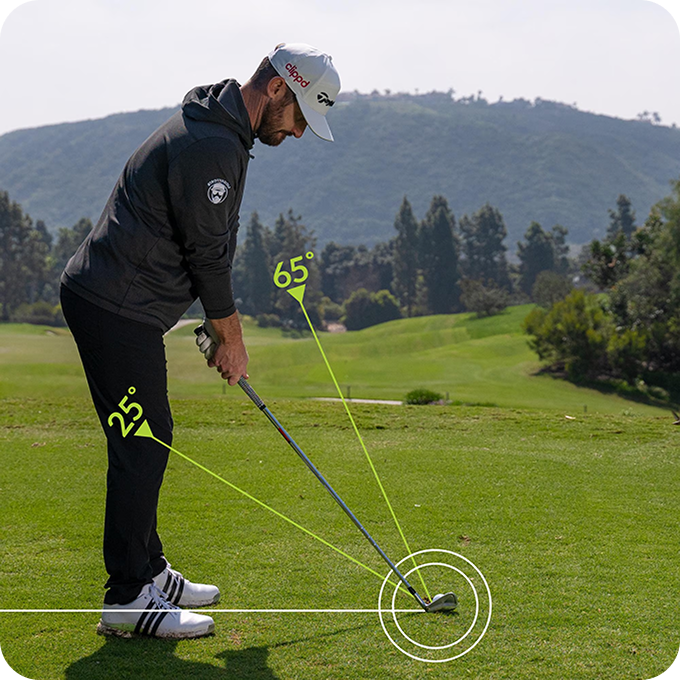
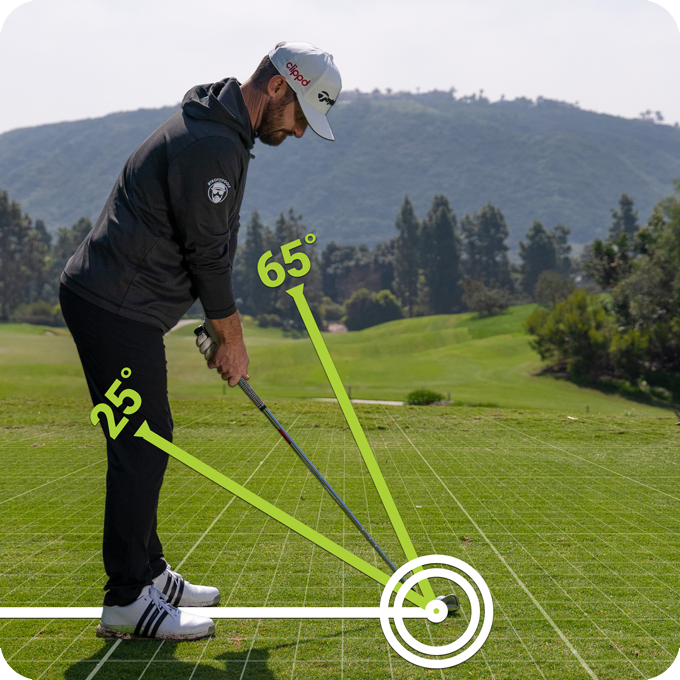
Shaft Angle at Address Position P1 refers to the angle between the club shaft and the ground, indicating how upright or flat the club shaft is at setup. A higher shaft angle generally corresponds to higher hand positioning, which is more common with shorter clubs.
The shaft angle plays a crucial role in determining the swing plane. For example, standing closer to the ball with a short wedge creates a higher shaft angle, leading to a steeper swing plane. Conversely, a longer club like a driver results in a flatter shaft angle and shallower swing plane.
Comparing the Shaft Angle at Address P1 to the Shaft Angle at Impact P7 can be valuable for assessing swing consistency and efficiency.
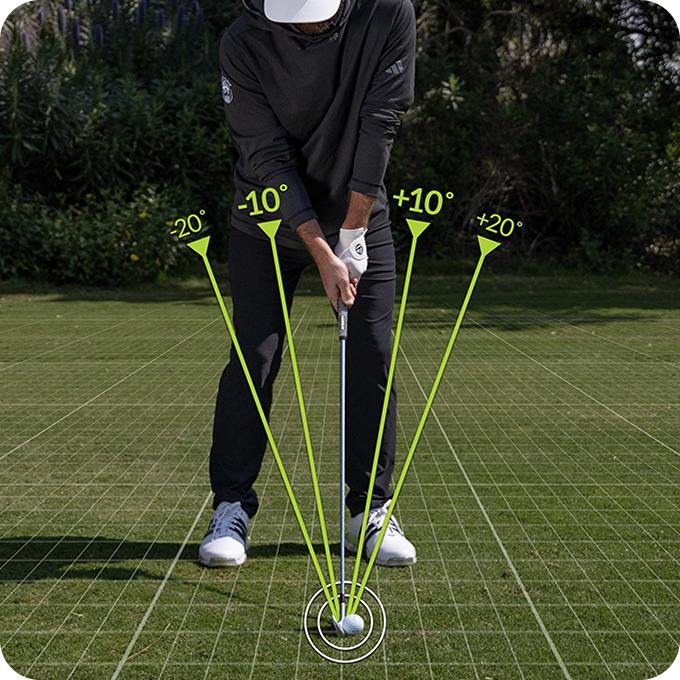
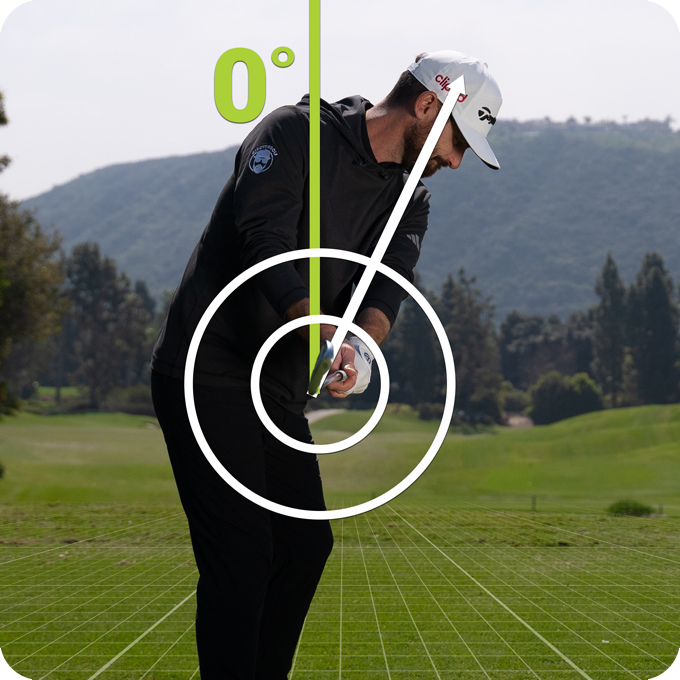
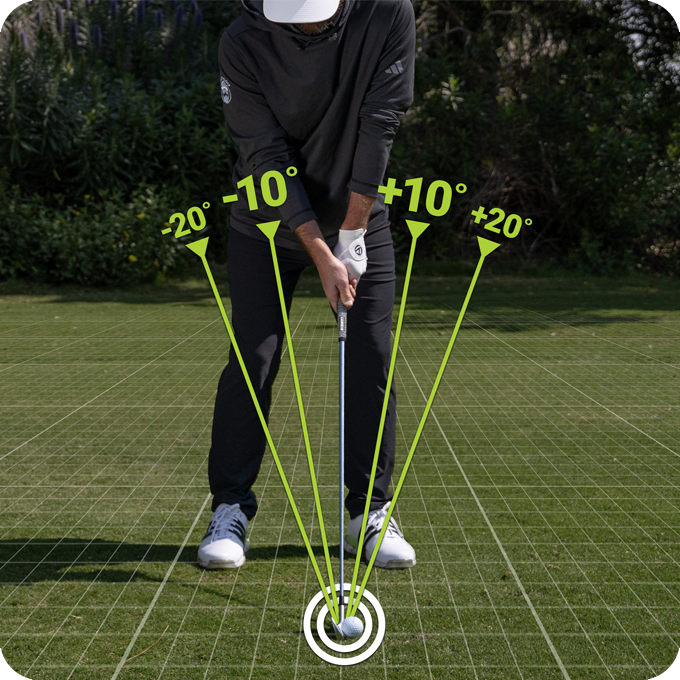
Shaft Lean at Adress Position P1 measures how far the hands are pressed forward (+) or backward (-) at address relative to a vertical line.
A forward shaft lean, or "forward press", indicates that the hands are ahead of the ball. A backward shaft lean indicates the hands are behind the ball.
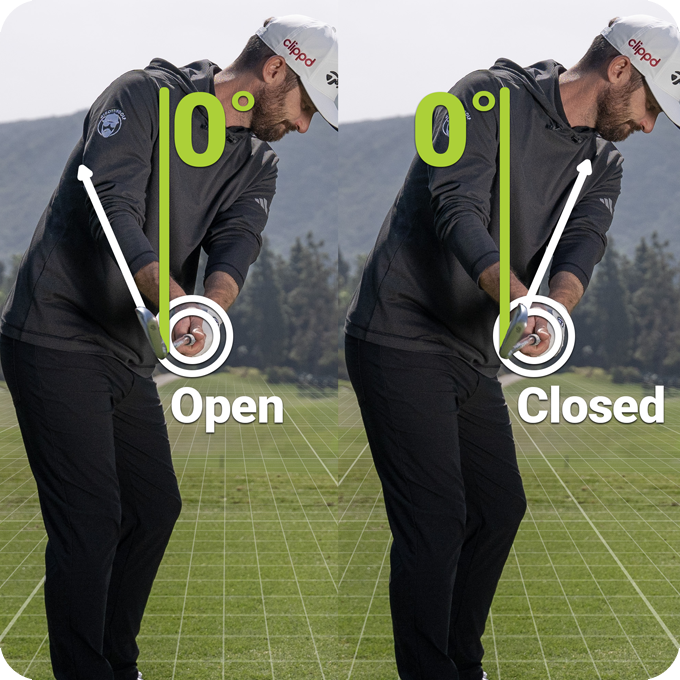
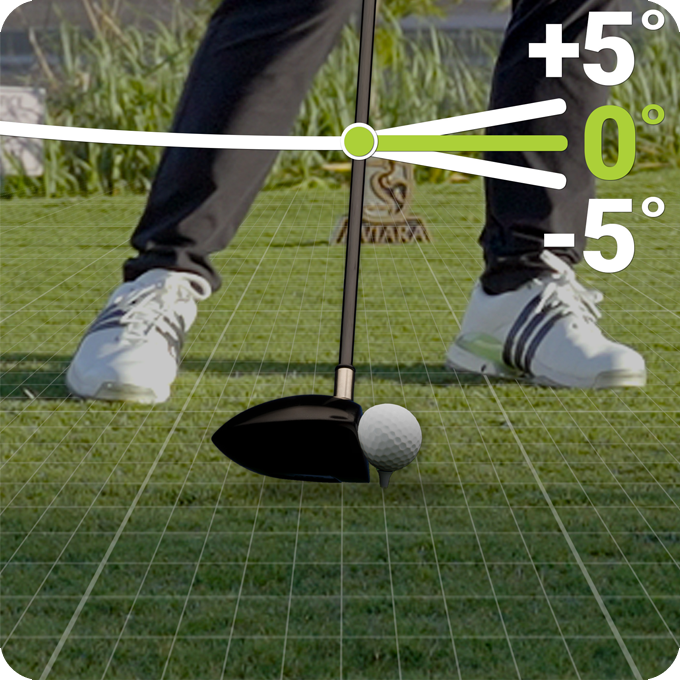
Face Angle at Halfway Back Position P2 refers to the angle of the clubface relative to vertical when the shaft is parallel to the ground. When the face angle points straight up it is at 0°.
A Face Angle that points downward from 0° is reported by SuperTag® as closed (+), while a clubface that points upward from 0° is reported as open (-).
Generally, the Face Angle at Half Back should be slightly closed and approximate a golfer’s spine angle.
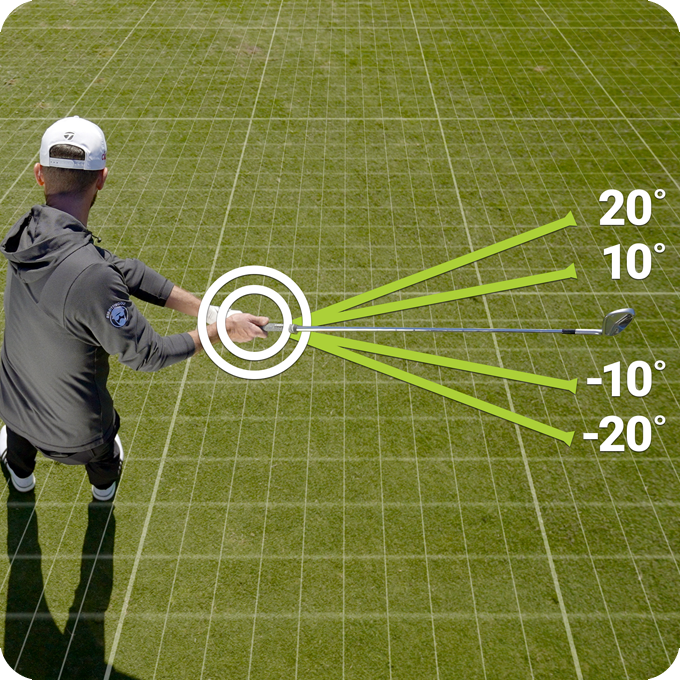
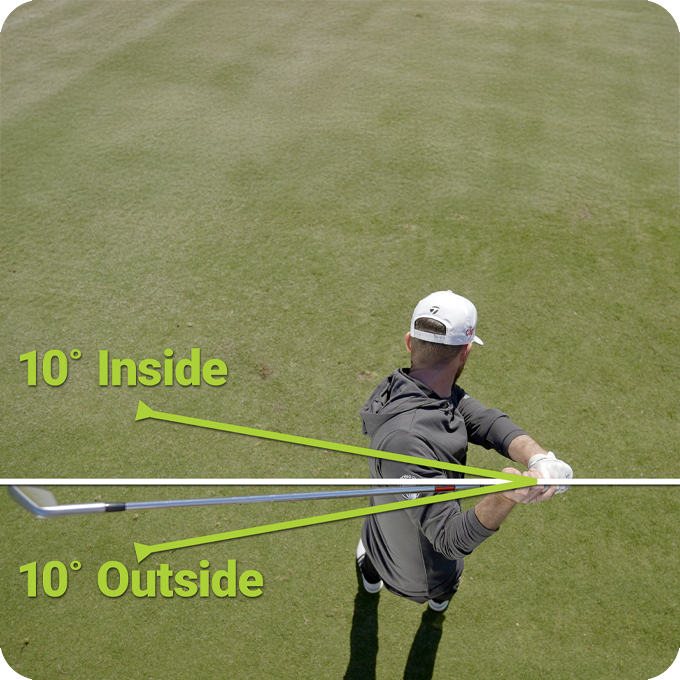
Shaft Direction at Halfway Back Position P2 measures the position of the club shaft during the takeaway, specifically when the shaft is parallel to the ground for the first time in the backswing. At this point, the direction of the shaft indicates how far inside or outside the club is relative to the target line.
When the club is back perfectly online, the shaft will be parallel to the target line and the shaft direction will measure 0°. However, if the shaft points too far inside or outside at P2, it can lead to other swing issues that result in poor contact or directional inconsistency. While some great golfers have played successfully with extreme inside and outside shaft positions at P2, a more neutral position often leads to more reliable ball striking.
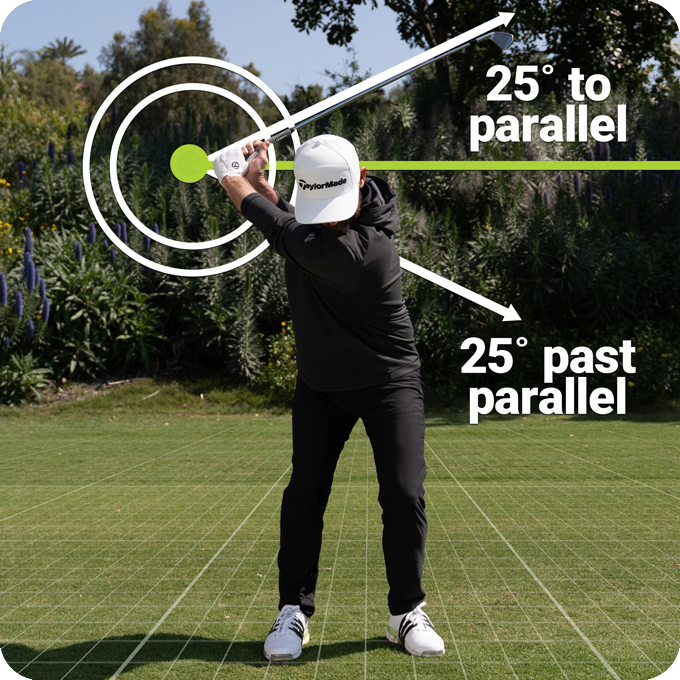
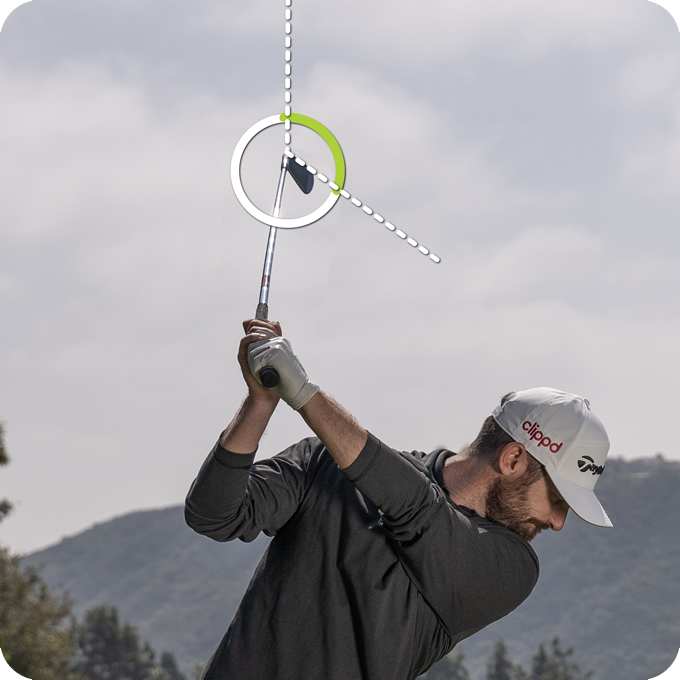
Backswing Length at Top Position P4 measures the angle of the club shaft at the top of the backswing, marking the transition to the downswing.
For full swings, it is measured by how close the shaft is to becoming parallel to the ground. With longer clubs such as the driver, the shaft may reach, or even go slightly past parallel.
For partial swings, such as pitches, and chips are measured in terms of where the club shaft would be on a clock face.
Face Angle at Top Position P4 measures the face angle at the top of the backswing in degrees below or above horizontal.
A square clubface typically falls between 40° and 50° below horizontal for most backswings. Swings with higher hand positions (more upright) will have a greater angle, while flatter swings with lower hands will have a smaller angle.
Shaft Direction at Top Position P4 refers to the direction of the shaft at the peak of the backswing when the club is at its furthest point from the address position.
This angle is measured in relation to the golfer’s target line and indicates how “on-plane” the club is at this stage of the golf swing.
An outside Shaft Direction at Top P4 indicates the shaft is positioned short of the target line or "laid-off" while an inside direction suggests that the shaft has "crossed over" the line.
Face Angle at Halfway Down Position P6 is the angle of the clubface at the last position of the downswing before impact where the club shaft is parallel to the ground.
Face angle at P6 is measured relative to the vertical and is 0° when the toe points straight up.
The farther downward the clubface points, the more closed (+) the club face. Conversely, if the clubface points upward past vertical it is more open.
Generally, the face angle at P6 should approximate the face angle at P2 +/- a few degrees and may be about the same as the spine angle.
Shaft Direction at Halfway Down Position P6 measures the direction of the club shaft during the downswing when the club is parallel to the ground.
At this position, the golf shaft should be approximately parallel to the target line. However, this exact position can vary slightly based on the golfer's swing style and individual characteristics.
If the club is returned perfectly to the target line, the shaft direction will read 0°.
Shaft Lean at Impact Position P7 is a measure of the angle of the club shaft, leaning either forward or backward at impact.
This angle indicates how far the handle of the club is positioned ahead or behind the club head and ball at the moment of impact. A forward shaft lean indicates that the hands were ahead of the ball. A backward shaft lean indicates the hands were behind the ball.
SuperTags measure the angle, up or down, Angle of Attack (AoA) at Impact Position P7 that the club “shaft” is traveling towards the ball at impact. If the club shaft is moving down at impact, the Shaft AoA is a negative (-) number. If it is moving up, the shaft AoA is a positive (+) number.
It is important to note that factors such as forward, backward, and vertical bending of the shaft, caused by shaft flex and kick point, can influence the clubhead’s angle of attack. Whereas the Shaft AoA provides a true measure of how a golfer is moving the handle of the club. As such, there may be differences between clubhead AoA as measured with a launch monitor and the Shaft AoA.
Every golfer has a Shaft Angle of Attack (AoA) that is most effective for their swing style. By swinging with the most effective Shaft AoA, a golfer can more accurately select a shaft that achieves the desired clubhead angle of attack. Thus, creating a perfect synergy between swing and club.
Shaft Angle at Impact refers to the position of the golf club's shaft relative to the ground at impact.
Shaft Angle at Impact can vary depending on several factors, including the club length, distance from ball, swing style, and the desired shot shape.
Comparing the Shaft Angle at Address (P1) to the Shaft Angle at Impact (P7) can be valuable for assessing swing consistency and efficiency. Observing how these angles differ can help identify areas for improvement and ensure a more effective swing.
Clubhead Speed, or CHS, is a measure of how fast the putter is moving at impact P7. Developing a good feel for CHS is essential for achieving effective distance control, especially in putting where minor variations in CHS can significantly influence the distance that a golf ball rolls.
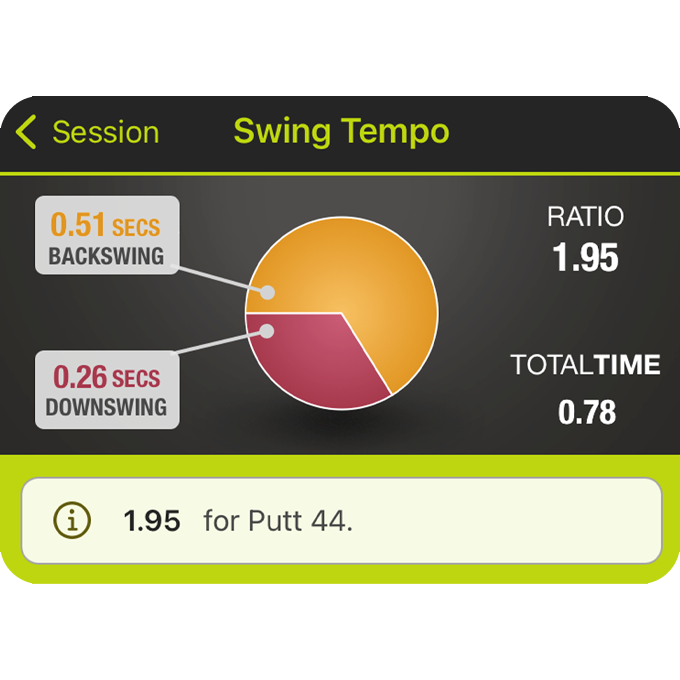
Putting Stroke Tempo refers to the rhythm of a putting stroke measured as the ratio of backswing time to downswing time.
A consistent tempo is essential for developing a reliable putting stroke that achieves both directional accuracy and distance control. Most professional golfers demonstrate a Putting Stroke Tempo of approximately 2:1, meaning that their backstroke takes twice as long as their forward stroke.
Understanding and practicing this ratio can help improve your overall putting performance.
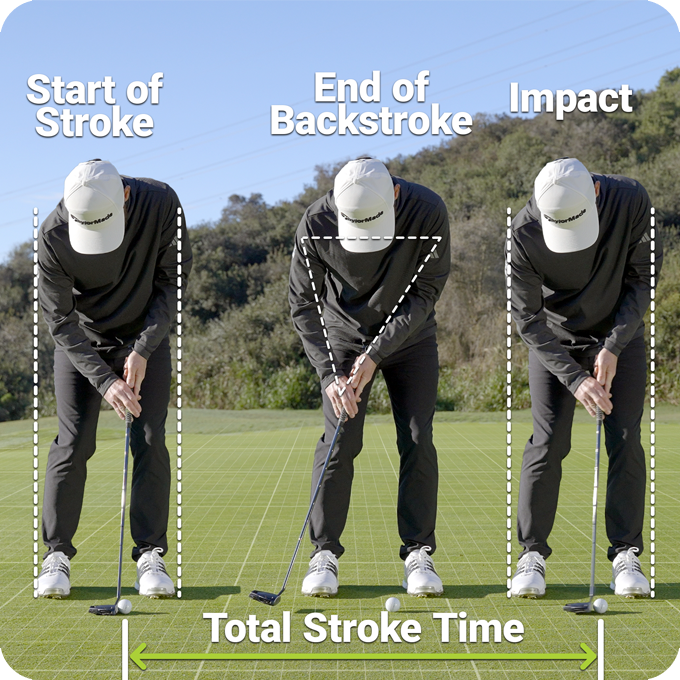
Total Stroke Time is the total elapsed time from the beginning of the backstroke to the moment of impact, measured in seconds.
This metric encompasses both the backstroke and forward stroke, allowing golfers to analyze the rhythm and timing of their putting stroke.
A well-timed stroke with a consistent pace leads to a more rhythmic motion resulting in better distance control and accuracy. Since Total Stroke Time and Tempo work together, finding the most effective Total Stroke Time (Pace) can help a golfer find their best rhythm (Tempo).
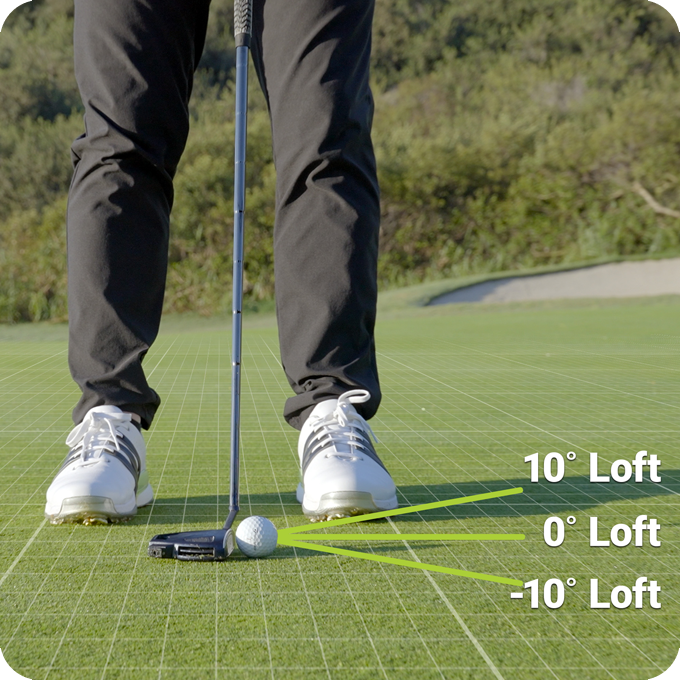
Dynamic Putter Loft at Address Position P1 measures the angle of the putter face relative to ground level at address. Typically putters feature a static loft of 2-4 degrees from horizontal.
The SuperTag measures and reports “dynamic loft” which indicates the actual loft of the putter face at address independent of the static loft, shaft lean, or shaft angle.
Leaning the shaft forward or backward or altering the lie by changing the shaft angle can impact dynamic loft. For instance, tilting the shaft back increases dynamic loft, while angling the face downward decreases it.
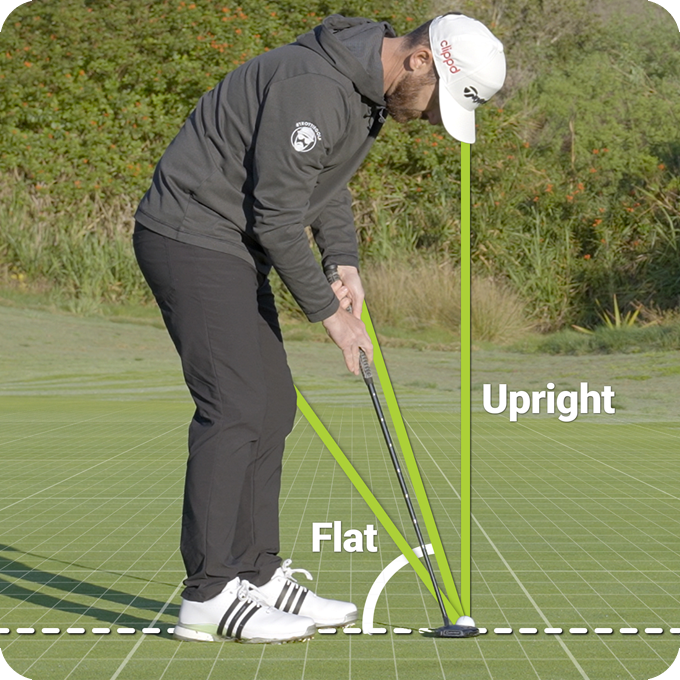
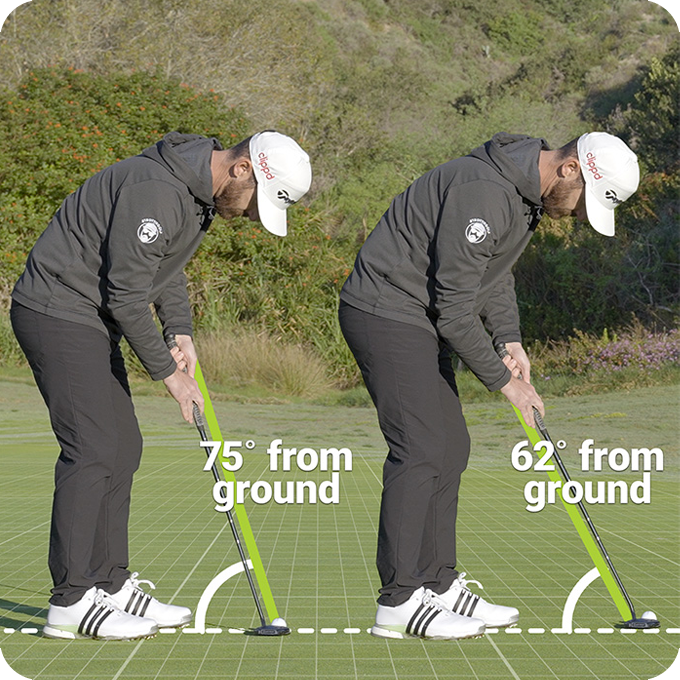
Putter Shaft Angle at Address Position P1 measures the vertical angle of the club shaft relative to the ground.
This angle is crucial for ensuring that the sole of your putter sits flat on the green at address.
If the shaft angle is too steep (upright) the putter head will rest with the toe-down and the heel-up. Conversely, if the Shaft Angle is too flat, the putter will sit with the toe-up and the heel-down. Achieving the correct shaft angle is essential for a stable and consistent putting setup.
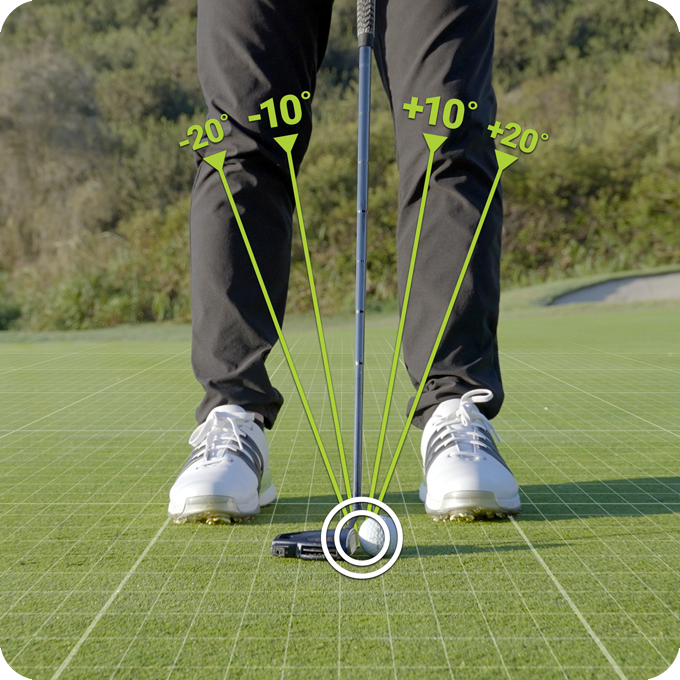
Shaft Lean at Adress Position P1 measures the angle of the club shaft relative to the vertical, indicating how far the hands are positioned either forward (+) or backward (-) at address.
A forward shaft lean, often called a "forward press", means that the hands are ahead of the ball, while a backward shaft lean suggests that the hands are behind it.
Backstroke Length at Transition measures the farthest point a golfer takes the putter away from the ball during the back stroke before the change of direction to the forward stroke. The length of this backstroke is a critical factor, along with Putter Head Speed, in determining how far a putt rolls.
Shaft Direction at Transition P4 measures how “on-plane” the putter shaft angle is at the end of the backstroke at transition P4.
An outside value means the putter was taken back on a path that is outside the target-line plane, while an inside value signifies the opposite.
Most golf instructors agree that a target of 0° is ideal regardless of whether the putter travels on a straight or arced path. An inside Shaft Position will often result in a push, while an outside Shaft Position typically results in a pull.
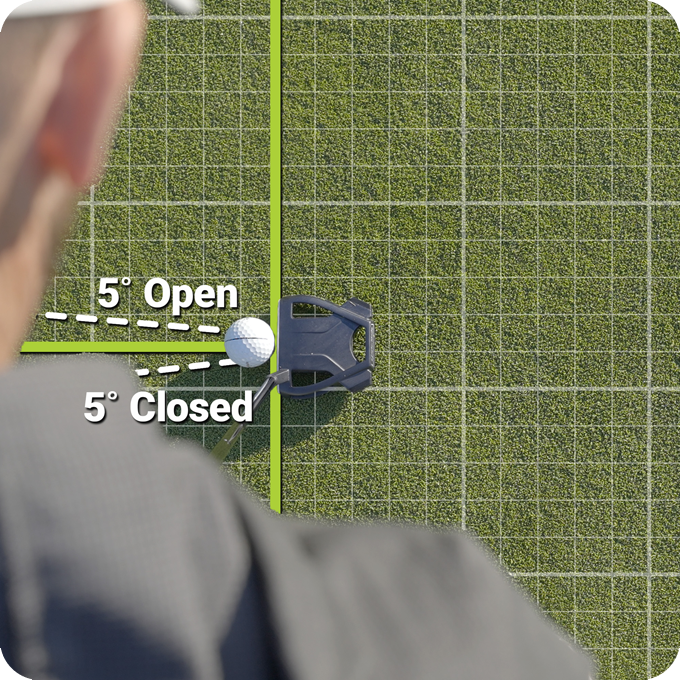
Putter Face Angle at Impact Position P7 measures the difference between the putter's face angle at the start of the putting stroke and its face angle at impact.
Face Angle is a critical factor in determining the direction of the putt. Typically, studies suggest that about 80% to 90% of any deviation in putter face angle from square is transferred to the starting line of the putt.
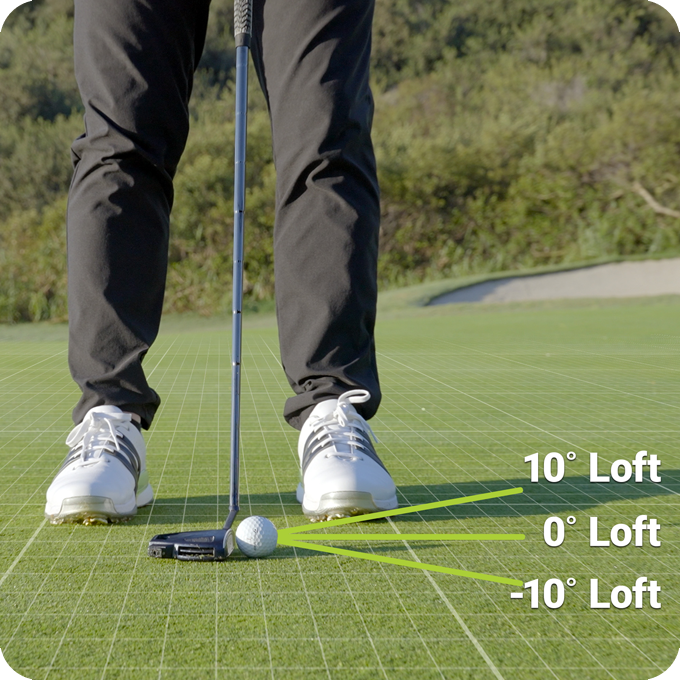
Putter Dynamic Loft at Impact Position P7 refers to the angle of the putter face relative to the ground at the moment of impact with the ball. Unlike static loft, which is the manufacturer-defined angle of the clubface when the putter is stationary, dynamic loft accounts for how the putter is positioned and swung during the stroke.
This angle is essential for determining both the trajectory and roll of the ball on the green.

Research suggests that a dynamic loft in the range of -1° (down) to +3° (up) is a good place to start , with +1° to +2° cited as ideal for optimal performance on the greens, balancing lift and roll for better accuracy and distance control.

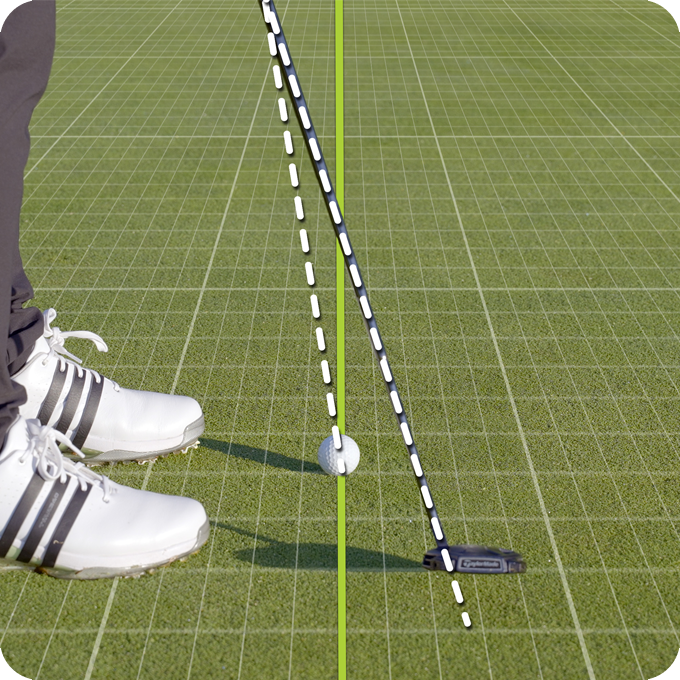
Putter Path Direction at Impact Position P7 measures the path the putter travels through the ball in relation to the target line.
An inside-to-out path indicates that the putter is travelling away from the golfer and across the target line, which may result in a push. Conversely, an outside-to-in path indicates that the putter is travelling toward the golfer and across the target line, potentially causing a pull.
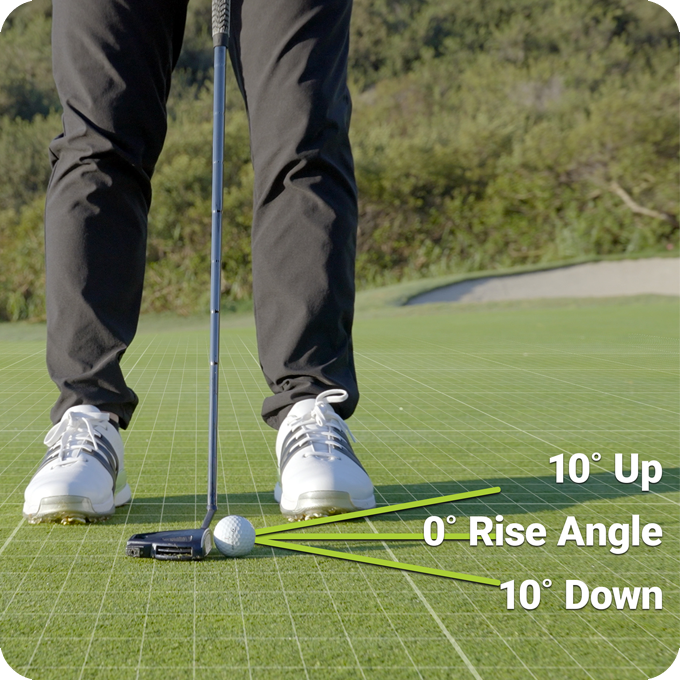
Putter Rise Angle at Impact Position P7 is the vertical angle of the putter’s path relative to the horizontal plane of the ground at impact.
A positive Rise Angle indicates that the putter head is moving upwards away from the surface of the green, while a negative Rise Angle indicates that it is moving downwards towards the green.
Putter Shaft Angle at Impact Position P7 measures how steep or flat the putter shaft is at the moment of impact, directly influencing the lie of the putter as it strikes the ball.
If the Shaft Angle at Impact P7 is too flat, the putter head will be in a toe-up/heel-down position, increasing the likelihood of a pull. Conversely, if the Shaft Angle is too upright, the putter head will be toe-down/heel-up, which can lead to a push.
Putter Shaft Lean at Impact Position P7 measures the angle of the putter shaft relative to the vertical, indicating how far the hands are positioned, either forward (+) or backward (-) at impact.
A forward shaft lean means that the hands are ahead of the ball, a backward shaft lean suggests that the hands are behind it.
A slight forward shaft lean is commonly used to ensure a clean strike and a smoother roll.
What SuperTag™ packages are available, and how many do I need for GameTraX™ 360?
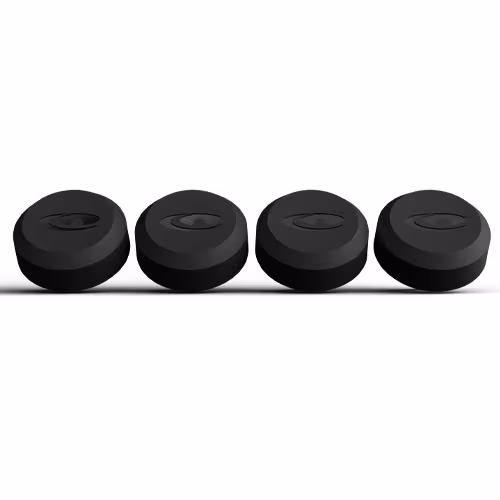
SuperTags™ are available in three package options:
1 Tag - Perfect if you need a replacement or want to track swing metrics for a single club using GameTraX™ 360.
4 Tags – Great for tracking multiple clubs or expanding your setup gradually.
14 Tags – The complete set needed for full-round tracking with GameTraX™ 360 (one tag for each club in your bag).
For the best experience and full functionality with GameTraX™ 360, we recommend using all 14 SuperTags™—one for every club in your set.
Need help? Our Support Team is happy to assist:
US Customers: 866-759-4653
UK & EU Customers: 0800 883 0505
Do I need a SkyGolf Membership Plan?
SwingTraX™ 360 requires a SkyGolf 360 Birdie plan at a minimum.
GameTraX™ 360 requires a SkyGolf 360 Pro X plan at a minimum (which also includes all SwingTraX™ 360 features).
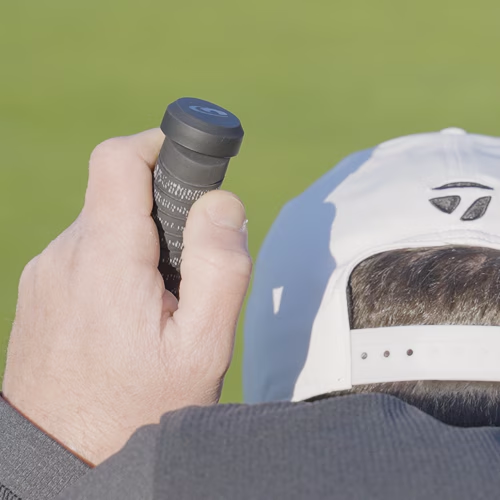
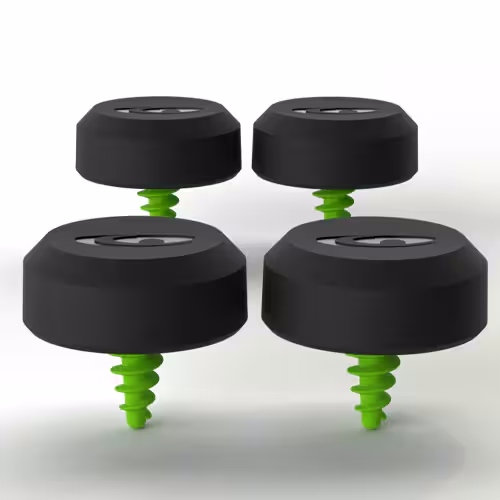
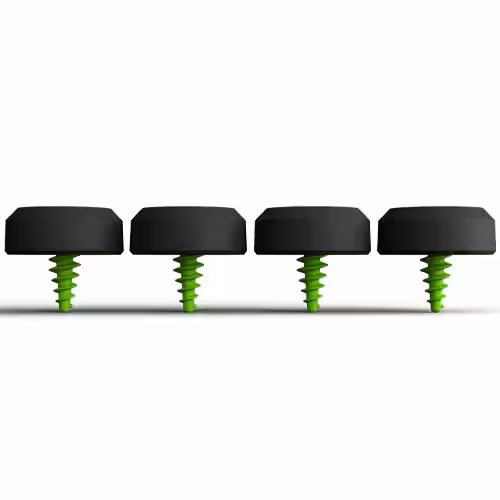
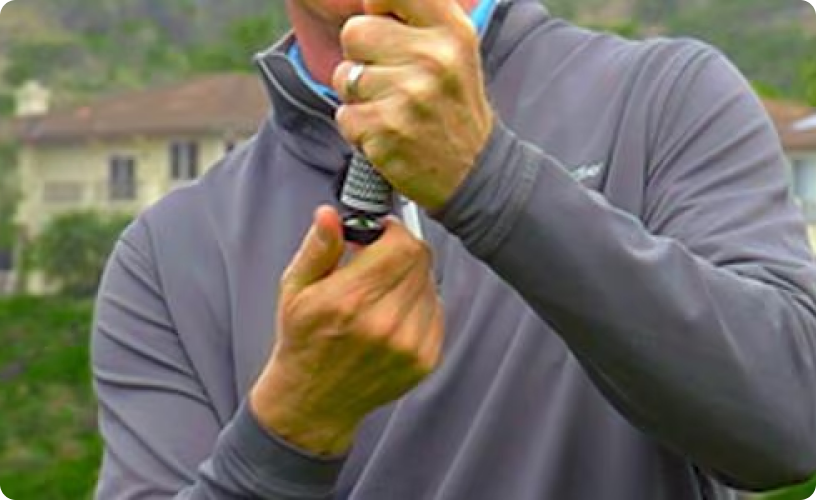
How does a SuperTag™ attach to my club?
What device do I need? SkyCaddie, iOS or Android?
Other SkyCaddie model device releases will be coming soon. Check back soon for an official announcement.
What is the difference between SwingTraX™ and GameTraX™?
The primary difference in the two is SwingTraX™ 360 creates a 3D model of your swing from a multitude of data metrics and can function alone, while GameTraX™ 360 provides for full GPS round tracking capturing every shot played on the course.
SwingTraX™ 360 is included with GameTraX™ 360.
Where do I review all my rounds, statistics, swing metrics and club data?
SkyGolf 360 is golf's greatest online community that connects you with other golfers, tracks all aspects of your game, and provides statistical analysis of your rounds to help you improve. SkyGolf products communicate seamlessly with the SkyGolf 360 Cloud to store your game data and help you enjoy better golf through better information.
To view all of your data login to SkyGolf 360 by visiting https://www.skygolf360.com or using the SkyGolf 360 mobile App. Login using your SkyGolf username and password.
Need help? Our Support Team is happy to assist:
📞 US Customers: 866-759-4653
📞 UK & EU Customers: 0800 883 0505
Is my Golf Course mapped to use SuperTags™ for game/round tracking?
SkyGolf has over 36,000 ground mapped courses in our library so it is likely your course is already available. Please search our course database to verify your course is available and if it's not let us know as we are constantly adding new courses.
Need help? Our Support Team is happy to assist:
📞 US Customers: 866-759-4653
📞 UK & EU Customers: 0800 883 0505
How do I get technical support if I need help?
For help with SwingTraX™ 360, GameTraX™ 360, SuperTags™ or any other SkyGolf product click the link below for assistance.
Need help? Our Support Team is happy to assist:
📞 US Customers: 866-759-4653
📞 UK & EU Customers: 0800 883 0505
SuperTag Calibration Guide
Get the most accurate data from your SuperTags by properly calibrating each one to your clubs. Follow the steps below to ensure a smooth setup process.
Step 1: Install the SkyCaddie Mobile App
Before you start calibration, make sure the SkyCaddie Mobile
app is installed on your smartphone.
Step 2: Start the Calibration Process
The app will connect to the SuperTag and guide you through the setup.
Step 3: Align Your Club and Phone
Positioning:
- Right-handed? Use your left arm.
- Left-handed? Use your right arm.
Leveling:
Rotation:
Step 4: Confirm and Save
After calibration:
🔍 Tip: Slight mismatches in club detection can occur due to differences in manufacturer specs (like loft or shaft length). These can be quickly adjusted in the app.
Extra Tip: Calibrating Woods
Woods have a curved clubface, so for best results:
Use the included O-ring to help level your smartphone against the clubface.
This helps account for the natural bulge and roll of woods.
Need help? Our Support Team is happy to assist:
📞 US Customers: 866-759-4653
📞 UK & EU Customers: 0800 883 0505
What Is Strokes Gained and How Will It Help Me?
Strokes Gained is a powerful performance metric that shows you where you're gaining—or losing—strokes compared to other golfers. It's like having a detailed report card for your game, broken down into four key areas:
Know exactly where you're losing strokes so you can focus your practice where it counts most.
See improvements over time in specific areas of your game.
Use real data to choose the right clubs, strategies, and practice routines.
🎥 Want a visual breakdown?
[Click here to watch the video]
Need help? Our Support Team is happy to assist:
📞 US Customers: 866-759-4653
📞 UK & EU Customers: 0800 883 0505
SuperTag Battery Replacement Service
How long does the SuperTag battery last?
SuperTags are built to last—with a battery life of up to 2 years under normal use. While there's no on/off switch, each SuperTag is equipped with a Deep Sleep Mode that conserves power when the tag is not actively being used, helping extend battery life even further.
Need a battery replacement?
If your SuperTag battery has run its course, don't worry! A Battery Replacement Kit is available. Simply reach out to our Customer Service Team to place your order.
Need help? Our Support Team is happy to assist:
📞 US Customers: 866-759-4653
📞 UK & EU Customers: 0800 883 0505
SuperTag Non-Compatible Grips & Clubs
While SuperTags work with most modern golf grips, there are a few exceptions. For the best fit and performance, please avoid using SuperTags with the following:
If you're unsure whether your grip is compatible, feel free to contact our Customer Service Team:
📞 US Customers: 866-759-4653
📞 UK & EU Customers: 0800 883 0505
How to Activate SwingTrax with a Pre-Paid Card
If you purchased SuperTags but don’t have a SkyCaddie device, follow these steps to activate SwingTrax using your pre-paid card:
Once your activation is complete:
That’s it! You're ready to start tracking your performance with SwingTrax.
Need help? Our Support Team is happy to assist:
📞 US Customers: 866-759-4653
📞 UK & EU Customers: 0800 883 0505
Can I Customize the App to Track Only What I Want with the SuperTags?
Yes! You’re in control of what swing data you see. To customize your swing metrics in the SkyCaddie Mobile app, follow these steps:
This lets you focus on the data that matters most to you—whether that’s club speed, tempo, face angle, or just the basics.
Need help? Our Support Team is happy to assist:
📞 US Customers: 866-759-4653
📞 UK & EU Customers: 0800 883 0505
How to Set Pins & Zones
Dial in your accuracy with customizable pin placements! There are several ways to set pins on your SkyCaddie device:
Setting accurate pin placements gives you precise distances to the front, center, and back of the green—plus better Strokes Gained data to track your performance like a pro.
📽️ Need help? Watch our how-to video:
Need help? Our Support Team is happy to assist:
📞 US Customers: 866-759-4653
📞 UK & EU Customers: 0800 883 0505
“The Tag You Were Setting Up Could NOT Be Updated” Error
This error typically occurs when your phone or SkyCaddie device isn't properly aligned with the clubface during setup. Here’s how to fix it and get your SuperTag calibrated successfully:
Use the O-Ring for Stability
We recommend using the rubber O-ring included with your SuperTags. It helps align the tag correctly—especially on Woods and Drivers, but it can help with any club.
Check Your Grip & Tag Placement
Not sure if it’s aligned right? Send us clear photos of the grip and tag from different angles—close-ups of how it sits and wider shots to show any curves or tilt.
Check Your Phone or SkyCaddie Device
Test for a Faulty Tag
What if Calibration Won’t Start (Tag Not Seen)?
This usually means the tag isn’t being detected at all. Try the following:
Need help? Our Support Team is happy to assist:
📞 US Customers: 866-759-4653
📞 UK & EU Customers: 0800 883 0505
Can't Get My SuperTag to Calibrate?
Here’s What to Do.
If your SuperTag won’t calibrate or connect, don’t worry—there are several things you can try. This guide walks you through troubleshooting steps to get your tag up and running.
If you're using SkyCaddie Mobile only (no hardware device), calibrate through the app to update your tags:
Grip & Tag Check
Phone/Device Check
Swap Tags to Isolate the Issue
Check Lighting
Use the Nearby Tags Tool (SkyCaddie/Android Only)
Go to Menu > Settings > Nearby Tags to see all nearby SuperTags:
You’ll see:
💡 Gently rock the club with the tag to trigger movement.
➡️ If the tag appears, take a screenshot or record the signal strength.
If no tags show up at all, it's unlikely the tag is faulty. But if only one tag doesn’t appear, that tag may need replacing.
iOS:
Android:
SkyCaddie Devices:
Need help? Our Support Team is happy to assist:
📞 US Customers: 866-759-4653
📞 UK & EU Customers: 0800 883 0505
How to Set Round Options for GameTraX & SwingTraX
To get the most out of your GameTraX and SwingTraX experience, make sure all round options are enabled before you tee off.
Go to the Non-Conforming section and make sure the following are turned ON:
These settings will unlock full tracking features for deeper performance insights and post-round analysis.
Need help? Our Support Team is happy to assist:
📞 US Customers: 866-759-4653
📞 UK & EU Customers: 0800 883 0505
Why Didn't My Swing Show Up in Practice Mode?
If you're swinging in Practice Mode but nothing is showing up, don’t worry—this is usually easy to fix.
SuperTag Sleep Mode
SuperTags have a built-in light sensor to conserve battery. If left in a dark golf bag or unused for a while, the tag may enter deep sleep mode.
To wake it up: Simply shake the club or expose the SuperTag to light.
Still Not Displaying Your Swing? Try These Tips:
-Start a Swing Practice session
-Turn ON ‘Capture Air Swings’ in settings
Need help? Our Support Team is happy to assist:
📞 US Customers: 866-759-4653
📞 UK & EU Customers: 0800 883 0505
Why Am I Getting an "Invalid Swing" Error?
Seeing an Invalid Swing message? Don’t worry—this can happen occasionally and is usually easy to fix.
What Causes It?
This error is often triggered when the club is wiggled or moved just before the swing begins. Try to pause and keep the club steady before starting your swing.
Still Seeing the Error? Follow These Steps:
Additional Tips for Putting:
Need help? Our Support Team is happy to assist:
📞 US Customers: 866-759-4653
📞 UK & EU Customers: 0800 883 0505
Why Am I Seeing Odd or Unusual Swing Data?
If your swing data looks off, it may be a sign that the SuperTag has shifted in the grip.
Make sure tag is secure in grip and then recalibrate the tag to ensure accurate tracking and performance.
Need help? Our Support Team is happy to assist:
📞 US Customers: 866-759-4653
📞 UK & EU Customers: 0800 883 0505
Software Update- SkyCaddie Mobile (android/iOS)
Software Update
Android SCM - App 3.1.4
iOS version - App 3.5
New Features:
+ additional improvements and bug fixes
click here for details.
for more information, please visit our website, www.skygolf.com, or contact our Customer Service agents by calling 866.Skygolf
866.759.4653
What is the “Acquired Tag” prompt when setting up a SuperTag?
When setting up a SuperTag, you may see an “Acquired Tag” prompt asking whether the tag was obtained from someone else. This prompt appears when the tag might already be assigned to a previous owner. If you acquired the tag from someone else, select “Yes”—this allows the system to check for and reassign the tag from the previous owner. If the tag is brand new or one you’ve already set up, select “No” so it can be configured normally. Choosing the correct option helps prevent duplicate assignments, ensures accurate ownership tracking, and avoids setup issues caused by tags still being linked to another user.
What is the Swing History setting in SuperTags?
The Swing History setting allows you to manage how your swing data is downloaded and synced to your SuperTags. You can choose between syncing only your recent swings (such as the last six months) or all swings from SkyGolf. This gives you control over how much swing history is stored and helps balance data availability with device storage and sync time.
Installing SuperTags
Installing SuperStroke
Calibrating SuperTags
Recalibrating SuperTags
Unassigned a SuperTag
Setting Pins and Zones
Starting a Round
Viewing Swings
Auto Putts
Target View
Editing a Round in SkyGolf 360
Strokes Gained
MyPar
Selecting Metrics
Tournament Mode
| Supertag™ VS. Competition | ||||||||||||||||||||||||||||||||||||||||||||||||||||||||||||||||||||||||||||||||||||||||||||||||||||||||||||||||||||||||||||||||||||||||||||||||||||||||||||||||||||||||||||||||||||||||||||||||||||||||||||||||||||||||||||||||||||||||||||||||||||||||||||||||||||||||||||||||||||||||||||||||||||||||||||||||||||||||||||||||||||||||||||||||||||||||||||||||||||||||||||||||||||||||||||||||||||||||||||||||||||||||||||||||||||||||||||||||||||||||||||||||||||||||||||||||||||||||||||||||||||||||||||||||||||||||||||||||||||||||||||||||||||||||||||||||||||||||||||||||||||||||||||||||||||||||||||
|
||||||||||||||||||||||||||||||||||||||||||||||||||||||||||||||||||||||||||||||||||||||||||||||||||||||||||||||||||||||||||||||||||||||||||||||||||||||||||||||||||||||||||||||||||||||||||||||||||||||||||||||||||||||||||||||||||||||||||||||||||||||||||||||||||||||||||||||||||||||||||||||||||||||||||||||||||||||||||||||||||||||||||||||||||||||||||||||||||||||||||||||||||||||||||||||||||||||||||||||||||||||||||||||||||||||||||||||||||||||||||||||||||||||||||||||||||||||||||||||||||||||||||||||||||||||||||||||||||||||||||||||||||||||||||||||||||||||||||||||||||||||||||||||||||||||||||||
|
||||||||||||||||||||||||||||||||||||||||||||||||||||||||||||||||||||||||||||||||||||||||||||||||||||||||||||||||||||||||||||||||||||||||||||||||||||||||||||||||||||||||||||||||||||||||||||||||||||||||||||||||||||||||||||||||||||||||||||||||||||||||||||||||||||||||||||||||||||||||||||||||||||||||||||||||||||||||||||||||||||||||||||||||||||||||||||||||||||||||||||||||||||||||||||||||||||||||||||||||||||||||||||||||||||||||||||||||||||||||||||||||||||||||||||||||||||||||||||||||||||||||||||||||||||||||||||||||||||||||||||||||||||||||||||||||||||||||||||||||||||||||||||||||||||||||||||
|
||||||||||||||||||||||||||||||||||||||||||||||||||||||||||||||||||||||||||||||||||||||||||||||||||||||||||||||||||||||||||||||||||||||||||||||||||||||||||||||||||||||||||||||||||||||||||||||||||||||||||||||||||||||||||||||||||||||||||||||||||||||||||||||||||||||||||||||||||||||||||||||||||||||||||||||||||||||||||||||||||||||||||||||||||||||||||||||||||||||||||||||||||||||||||||||||||||||||||||||||||||||||||||||||||||||||||||||||||||||||||||||||||||||||||||||||||||||||||||||||||||||||||||||||||||||||||||||||||||||||||||||||||||||||||||||||||||||||||||||||||||||||||||||||||||||||||||
|
||||||||||||||||||||||||||||||||||||||||||||||||||||||||||||||||||||||||||||||||||||||||||||||||||||||||||||||||||||||||||||||||||||||||||||||||||||||||||||||||||||||||||||||||||||||||||||||||||||||||||||||||||||||||||||||||||||||||||||||||||||||||||||||||||||||||||||||||||||||||||||||||||||||||||||||||||||||||||||||||||||||||||||||||||||||||||||||||||||||||||||||||||||||||||||||||||||||||||||||||||||||||||||||||||||||||||||||||||||||||||||||||||||||||||||||||||||||||||||||||||||||||||||||||||||||||||||||||||||||||||||||||||||||||||||||||||||||||||||||||||||||||||||||||||||||||||||
|
||||||||||||||||||||||||||||||||||||||||||||||||||||||||||||||||||||||||||||||||||||||||||||||||||||||||||||||||||||||||||||||||||||||||||||||||||||||||||||||||||||||||||||||||||||||||||||||||||||||||||||||||||||||||||||||||||||||||||||||||||||||||||||||||||||||||||||||||||||||||||||||||||||||||||||||||||||||||||||||||||||||||||||||||||||||||||||||||||||||||||||||||||||||||||||||||||||||||||||||||||||||||||||||||||||||||||||||||||||||||||||||||||||||||||||||||||||||||||||||||||||||||||||||||||||||||||||||||||||||||||||||||||||||||||||||||||||||||||||||||||||||||||||||||||||||||||||
|
||||||||||||||||||||||||||||||||||||||||||||||||||||||||||||||||||||||||||||||||||||||||||||||||||||||||||||||||||||||||||||||||||||||||||||||||||||||||||||||||||||||||||||||||||||||||||||||||||||||||||||||||||||||||||||||||||||||||||||||||||||||||||||||||||||||||||||||||||||||||||||||||||||||||||||||||||||||||||||||||||||||||||||||||||||||||||||||||||||||||||||||||||||||||||||||||||||||||||||||||||||||||||||||||||||||||||||||||||||||||||||||||||||||||||||||||||||||||||||||||||||||||||||||||||||||||||||||||||||||||||||||||||||||||||||||||||||||||||||||||||||||||||||||||||||||||||||
Unlock exclusive deals, discounts, and insider golf tips
SkyGolf products require a membership to ensure golfers always have access to the most accurate, up-to-date course maps and performance data. The membership supports ongoing updates, cloud storage, and advanced features that help players play smarter and improve faster.